Ads 468x60px

Labels

Sample Text

Dec 9, 2011

Spy Files By Wikileaks Said Government Using Malware For Surveillance


The latest round of documents published by Wikileaks offers a rare glimpse into the world of surveillance products. The collection—which Wikileaks calls the Spy Files—includes confidential brochures and slide presentations that companies use to market intrusive surveillance tools to governments and law enforcement agencies. The documents published by Wikileaks include 287 files that describe products from 160 companies. The group says that these files are only the first set of a larger collection and that more will be published in the future. The project is being carried out in collaboration with activist groups such as Privacy International and press organizations such as the Bureau of Investigative Journalism and the Washington Post.
"[The surveillance industry] is, in practice, unregulated. Intelligence agencies, military forces, and police authorities are able to silently, and on mass, and [sic] secretly intercept calls and take over computers without the help or knowledge of the telecommunication providers," wrote Wikileaks in its report.
 "In the last ten years systems for indiscriminate, mass surveillance have become the norm."
Surveillance products revealed in the Spy Files cover a wide range of different communication technologies. Many are designed to circumvent standard privacy and security safeguards in mainstream consumer technology products so that they can collect as much data as possible. Some are even deliberately programmed to operate like malware.
The software will capture the content of encrypted communications—including instant messaging conversations, e-mails, and the user's Web activity—and will relay the data to the party conducting surveillance. The software also includes key logging, remote file access, and has the ability to capture screenshots. The company cites "zero day exploits" and "social engineering" in a bulleted list of ways that its remote forensic software can be installed on the computer of a surveillance target.

For More Information Click Here

SQL Injection Vulnerability, More Than 4000 Websites Under Risk


DNS service provider OpenDNS announced a preview release of a new open source tool named DNSCrypt to enhance internet security. DNSCrypt encrypts all DNS traffic between a user's system and a DNS server. The tool is currently only available for the Mac, with a Windows version promised, and only works with OpenDNS's own DNS service. Normally, DNS information is exchanged between client and server as plain text which makes it vulnerable to snooping or modification and man-in-the-middle attacks. By encrypting the exchange, OpenDNS hopes to make the "last mile" of DNS requests more secure.
 
In the Press Release David Ulevitch Founder/CEO of OpenDNS Said:-
"Today we unveil DNSCrypt, a new security tool we’ve developed that has been on our minds for a long time. It has a simple but important function: encrypt all DNS traffic between you and OpenDNS. Nothing else like it exists, and we have very high expectations for the positive impact it can have on the Internet security and privacy of millions of people around the world.
DNS is a critical part of the Internet’s infrastructure, and though a good deal of attention has been paid to improving its security in recent years with DNSSEC, an important part has been overlooked. It’s what’s often referred to as the “last mile,” or the connection between you and your ISP or your DNS provider, if you use a DNS service like OpenDNS. It’s in this “last mile” that bad things are most likely to happen — snooping, tampering, or even hijacking traffic. Anyone who knows what they’re doing can eavesdrop on your Internet activity and see exactly which domains you are resolving, and in many cases, what websites you’re visiting.
It happens all the time on insecure networks at coffee shops, and even residences. Some ISPs have even been accused of spying on their customers’ activity. What’s worse, the “last mile” is ripe for man-in-the-middle attacks, where an intermediary injects themselves into your traffic path masquerading as your intended destination, but all the while, being able to see and modify your traffic. This leaves little confidence for the Internet user.
DNSCrypt changes this and has the potential to completely revolutionize Internet security. DNS has, unfortunately, always had some inherent weaknesses because it’s transported in plain text. DNSSEC has never attempted to address that (crazy, I know). Encrypting all DNS traffic means a fundamental change to the security of the system on the whole and a strong improvement. It’s not the only solution, and there’s still an important place for verification and validation of domains like DNSSEC provides, but it’s a very strong first step."

For More Info & To Download DNSCrypt Click Here


Nov 4, 2011

USE START MENU IN WINDOWS 7 TO SEARCH THE INTERNET

Picture Do you know that you can use the start menu of windows 7 to search the internet ? It works only on windows 7 professional and ultimate editions.To enable internet search in start menu just follow these steps :
1. Open the Start menu, and type gpedit.msc in the search line and press Enter.Local Group Policy Editor will open.
2. In the left pane, click on User Configuration, Administrative Templates and Start Menu and Taskbar.
3. In the right pane, right click on Add Search Internet Link to Start Menu and click on Edit.
4. To Add Search Internet Link to Start Menu -A) Dot Enabled and click on OK.
5. To Remove Search Internet Link from Start Menu -A) Dot Disabled or Not Configured and click on OK

Steps to Lock and Unlock a Folder Using Notepad:

Sometimes you need to apply restriction of some folders which are really personal for you. There are many softwares to protect your folders from unauthorized access. Those software really cost much. But there is an alternate solution which also is capable to provide restriction of your private folders. You can do this by using notepad. This page contains information to lock a folder using notepad and to unlock a folder using another notepad.

Steps to Lock and Unlock a Folder Using Notepad:
Suppose, you have a personal folder named as MyFolder which has all the private information about you. So, you want to lock that folder. Moreover, you may also able to unlock that folder when you also necessary.
To lock the folder using a notepad follow the following steps:
1. Open notepad and copy the following code segment:
ren MyFolder MyFolder.{21EC2020-3AEA-1069-A2DD-08002B30309D}
2. Save the file as Lock.bat name. The extension of that file must be .bat extension.
3. Double click Lock.bat and the folder MyFolder will be locked.

Steps to unlock the folder using a notepad:

1. Open notepad and copy the following code segment:
ren MyFolder.{21EC2020-3AEA-1069-A2DD-08002B30309D} MyFolder
2. Save the file as UnLockKey.bat name. The extension of that file must be .bat extension.
3. Double click UnLockKey.bat and the folder MyFolder will be unlocked.

Oct 11, 2011

Windows 8 Features & Release Date


8 Features & Release Date

Windows, being one of the most used OS, brings great challenges for Microsoft to keep its users impressed in the next version of Windows.
Although Windows 7 has done exceptionally well since its release, Microsoft has been constantly working to make the next version of Windows a better one by further improving upon the existing features, and have added new impressive Windows 8 features along with a stunning UI.
Microsoft released the early version of Windows 8 on a prototype tablet last week. Those of you who would like to taste and experience the all new Windows 8, you can download the Developer Preview, which is currently in pre-beta version. The developer version shows off the current stage of the OS. It is available for free download, and comes in three different packages:
  • (1) 64-bit version – Only the OS
  • (2) 32-bit version – Only the OS
  • (3) 64-bit version with developer tools

Windows 8 Features

Windows 8 offers a number of new Windows 8 features from its all new UI to Windows App Store and improvised security features. Here’s a list of new features and improvements which will arrive with Windows 8:

Support for both x86 PCs and ARM tablets

Windows 8 is the first edition of Windows which will work on both ARM based tablets and traditional x86 (as well as x32 and x64) PCs based on ARM processors from Intel and AMD.
“Support for ARM-based chipsets, touch, and sensors makes Windows 8 work beautifully on your choice of a full spectrum of devices, such as 10-inch slates with all-day battery life, ultra-lightweight laptops, and powerful all-in-ones with 27-inch high-definition screens,” Microsoft contends, in a Windows 8 Guide distributed with Windows Developer Preview

Windows To Go

The “Windows To Go” seems to be an exciting feature that basically allows Windows 8 to boot from a USB device (called as Live USB), including user’s programs, settings and files. The feature is designed to work with both USB 2.0 and USB 3.0, and on both legacy NIOS and UDFI firmware. However, Microsoft says that a user will not be able to “Hibernate” with this feature.

Windows 8
“Windows To Go is a new feature in Windows 8 that enables enterprise administrators to create USB drives containing complete, managed Windows images that users can use to boot and run Windows on any Windows 7 or Windows 8 capable computer. Windows To Go makes it possible for employees to use a managed device whether they work from home, a client office or in a free seating environment. This session will discuss Windows To Go, its hardware requirements and building compatible and complementary software.”
Another interesting thing about this feature is that, if the USB drive is removed, Windows will automatically freeze, but will continue to operate if the USB drive is inserted back in the next 60 seconds after removal.

Windows Store

To compete with Apple, Windows has confirmed the introduction of a Windows Store, similar to Mac App Store, which allows users to browse through Windows applications, while developers can publish their Metro-style apps on Windows 8 devices.
Few days back, Microsoft gave a strategic view of its app store, and gave a quick demo on how it works. Microsoft revealed that the Windows App Store will be the only place where users can access the Metro-styled apps. Here’s a quick demo that shows how users will be able to buy their apps:


Windows 8 User Interface

Speaking about the UI, Windows 8 certainly has got a mind blowing interactive UI, which has been extensively redesigned to a “Metro-style” design, which shows the most important information to you, embodies simplicity, and gives you full control over it. The UI is designed to provide a fluid and intuitive interaction and navigation with touch, or a mouse and keyboard.
Julie Larson-Green, Corporate Vice President, Windows who stated: “Everything that’s great about Windows 7, is better in Windows 8,” gave a quick hands on look at the Windows 8 user-interface. Here are some of the screenshots she released:
Windows Logon Screen – Unlike the traditional way of entering a password to unlock the screen, Windows 8 can be unlocked by just tapping on the right areas of the screen.


Windows 8 Features
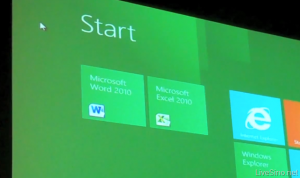
Windows 8 Start Screen – The Start screen is yet another impressive UI. The screen basically groups all your applications together, which you can easily drag and drop, or add new things.


Windows 8 Start Screen
Control Panel


Windows 8 Release Date
Playing Videos in Windows 8


Windows 8
Windows 8 Task Manager


Windows 8 Task Manager

Improved Windows Defender

The Windows Defender which was first released with Windows Vista is getting a security upgrade with the upcoming Windows 8. This would probably edge-our third-party antivirus and anti-malware programs. Windows Defender will become a full-fledged anti-malware solution for Windows 8. This will include protection against all types of malware such as virus, worms, trojans and rootkits.
In addition to that, Windows Defender will provide real-time detection and protection from malware threats using a file system filter, and will interface with Windows secured boot, which is another security feature.

Internet Explorer 10

The developer preview of Windows 8 comes with a Metro version of Internet Explore (IE) 10. Since it is a preview version, it does not support any browser plugins and extension – including Adobe Flash and Microsoft Silverlight. However, it will feature full screen browsing mode by default, implements several new HTML5 capabilities, turbocharges HTML5 performance, and adds some security options for Web applications.

Windows 8 Minimum System Requirements

It is reported that Windows 8 is expected to have the same system requirements as Windows 7, and will run on existing PCs/laptops that run Windows 7. Here are the following minimum system requirements to run Windows 8:
Processor: 1GHz or faster 32-bit or 64-bit processor
RAM: 1GB (32-bit) or 2GB (64-bit)
HD Space: 16GB for 32-bit (or 20GB for 64-bit)

AT&T Reveals Five New Android Smartphones


The folks at AT&T weren’t kidding when they announced plans to introduce 12 Android devices this year. The company just unveiled five Android smartphones, which brings AT&T’s total Android lineup to 19.
The new smartphones are Motorola Atrix 2, Samsung Captivate Glide, Samsung DoubleTime, Pantech Pocket and AT&T Avail (pre-paid customers).
Leading the pack is the powerful Motorola Atrix 2, with a 4.3-inch, 960×540 (qHD) screen, 1 GHz dual-core CPU, 1 GB of RAM, a 8-megapixel camera capable of full HD video capture and an additional camera for video chat.
Samsung Captivate Glide, as its name suggests, has a side-slide QWERTY keyboard. It also packs decent specifications: a 4-inch, 480×800 Super AMOLED screen, a 1 GHz dual-core Nvidia Tegra 2 CPU, 1 GB of RAM, and two cameras, a 1.3-megapixel one at the front and a full HD 8-megapixel one at the back.
Both devices support AT&T’s HSPA+ fast data transfer standard and both are running Android 2.3.
The Pantech Pocket is a mid-range device running Android 2.3, with a 1 GHz CPU, a 4-inch screen, a 5-megapixel camera. To like it, you’ll have to appreciate its form, as the device’s dimensions are 114.7 mm x 7 8mm x 11.3 mm, which makes it a lot wider than most candy bar phones.
Samsung DoubleTime is a device for those who want something different. Its specifications are nothing to write home about — a 600 MHz CPU, 3.2-inch screen and Android 2.2 — but its candy bar form opens to reveal a second 3.2-inch screen and a full QWERTY keyboard.
Finally, the AT&T Avail is for those that don’t like contracts (the other pre-paid smartphone in AT&T’s roster isLG Thrive). It’s a fairly standard candy bar mid-range smartphone, with Android 2.3, a 3.5-inch screen, a 5-megapixel camera and 512 MB of RAM.
Pricing and availability is unknown at this point, but we can expect all five devices to hit the market in 2011.

Oct 8, 2011

Ice Cream Sandwich Launch Delayed


Google and Samsung mysteriously pulled the plug Friday on the expected release of a new version of the Android operating system code named Ice Cream Sandwich (ICS).

The new release of Android is highly anticipated because it is expected to tie the smartphone version of the operating system, known as Gingerbread, and the tablet flavor, called Honeycomb.
An event billed as "Samsung Mobile Unpacked" was scheduled by Google and Samsung for next Tuesday at the CTIA show in San Diego where ICS and a new Samsung phone running it were expected to be unveiled. However, the companies have canceled the event.
“Samsung and Google decide to postpone the new product announcement at CTIA Fall," the companies said in a statement. "We agree that it is just not the right time to announce a new product. New date and venue will be shortly announced."
According to a Google spokesperson, the event was cancelled out of respect for Steve Jobs' passing.
Even with the postponement, the companies still have plenty of time to fulfill Google Executive Chairman Eric Schmidt's promise that ICS will be released in the October/November time frame.
The companies' announcement coincides with release of a video purportedly showing the new Samsung ICS phone in action. The phone, referred to by some Android watchers as the Nexus Prime or Galaxy Nexus, doesn't have any physical or capacitive buttons. Instead, they've been replaced by on-screen icons. In addition, the appearance of widgets on the device is similar to their appearance in Honeycomb.
Although Google has kept its cards close to its vest about ICS, a number of things have been reported about it.
Widgets will be richer and resizable, as they are in the tablet version of Android.
More multitasking will be added to the system and the OS will be open source.
The system will be tailored to take advantage of devices that use the Texas Instrument's OMAP chip.
As with any Android upgrade, what Android devices will be eligible for the new system will remain with the manufacturers, but two good bets for the upgraded OS are the Samsung Nexus S and the Motorola Xoom.

Apple Fans Pay Creative Tributes to Steve Jobs


Before the advent of iPods, iPhones, and iPads, Apple products were best-known for being a favorite among creative professionals. So it's fitting that Apple fans around the world are mourning Steve Jobs with creative tributes of their own. Here are some of the best.

Randall Munroe, creator of the Web comic XKCD, imagines how a Steve Jobs memorial might look.
Steve Jobs finds a way for technology to make the afterlife easier. (Source)
In Apple's words, Steve Jobs' "spirit will forever be the foundation of Apple." This image by Jonathan Mak seems to articulate that idea
Remick Rose aims for the symbolic with this sad little image.
Graphic designer Blain Hefner is inspired by Apple's minimalism.
According to Andy Rash, "Iotacons are extremely low resolution portraits." Here's his tribute to Steve Jobs.
An artist by the name of Ashley conjures the tech world's feelings from within iOS.
Although Joseph Tame's tribute to Steve Jobs was completed when the Apple CEO stepped down in August, it seems just as fitting now.
In Ginza, Tokyo, Apple fans pay respect with digital candles--on iPads and iPhones, of course. Pietro Zuco took the photo.

Oct 7, 2011

3 Apple changed the world.


3 Apple changed the world.
1>One apple that adam and eve ate.
2>second apple that fall from tree and newton discovered gravity.
3>Third is Steve Job's apple.
R.I.P Great man.

Oct 6, 2011

20 Innovative (Concept) Tablets We Wish Were Real

It’s been around 1.6 years since the initial release of Apple iPad, and regardless the criticism, the device has achieved tremendous success in the tablet market. It’s so successful until so many great companies have risen up to challenge its realm by designing and releasing their own version of tablet.

concept tablet 20 Innovative (Concept) Tablets We Wish Were Real
(Image Source: Patrycjusz Brzezinski)
While great companies are competing each others by showing off new designs and devices, an interesting phenomenon happened: another group of very talented designers have also implemented their own vision on their tablet design, and these so-called concept tablets have received praises from consumers like, “I hope it’s true!”.
Be it dual screen tablet, fold-able tablet or smartphone powered tablet, in this post you will see concepts which designers combined innovation and art to become something that consumers really thirsts for. Enjoy them and let us know which tablet you hope it’s true!

Oct 1, 2011

Facebook Hacking......


In my previous post How to hack facebook password i told you about hacking facebook with phishing,Today i thought to uncover all the methods used to hack facebook password,

I will cover 4 methods over here:

1. Facebook Phishing
2. Keylogging
3. Social engineering
4. Primary email address hack

Facebook phishing:

I have taken this method first because i think this is the most popular method/way of hacking facebook. I studied various facebook surveys taken on web about hacking facebook. The results of these surveys show "Phishing" as the most used method to hack facebook and to note…"Phishing is favorite method of facebook hackers". So, friends.. beware of facebook Phishing. Facebook staff is working hard to avoid these Facebook phishers. Phishing not only allows you to hack Facebook but also almost any email account. You have to only get the trick used to make a phisher, which i think is very easy. I learnt it without any difficulty. But, remember, this is only for educational purpose. I will not extend this topic over here as i have added more on Phishing in my article How to hack facebook password

Keylogging:


This is my second favorite, as only thing you have to do is remotely install a keylogger application (if you don't have any physical access to victim computer). Keylogging becomes more easy if you have physical access to victim computer as only thing you have to do is install a keylogger and direct it to your destination so that it will send all recorded keystrokes to pointed destination. What a keylogger does is it records the keystrokes into a log file and then you can use these logs to get required Facebook password and thus can hack facebook password.


3. Social engineering:

This sounds to be pretty not working at beginning. Even I was neglecting this way. But, once, I thought of using it against my friend on Facebook and i got his Facebook password very easily by this method. I think many of you might be knowing how what this social engineering, For newbies, social engineering is method of retrieving password or answer of security question simply be quering with the victim. You have to be very careful while using this as victim must not be aware of your intention. Just ask him cautiously using your logic.


4.Primary email address hack